Java| 03 无限循环、跳转控制语句、数组等

无限循环(死循环)

for循环

1
2
3
for(;;){
System.out.println("Hello World");
}

while循环

1
2
3
while(true){
System.out.println("Hello World");
}

do while循环

1
2
3
do{
System.out.println("Hello World");
} while (true);

跳过控制语句

Idea快捷补全

在idea中输入5.fori会自动补全以下代码:

1
2
3
for (int i = 0; i < 5; i++) {

}

continue

详细用法: continue;指如果条件成立则退出本次循环, 继续下一个循环.

1
2
3
4
5
6
7
8
9
10
class Main {
public static void main(String[] args) {
for (int i = 1; i < 5; i++) {
if (i == 3){
continue;
}
System.out.println("进行第"+i+"次循环");
}
}
}

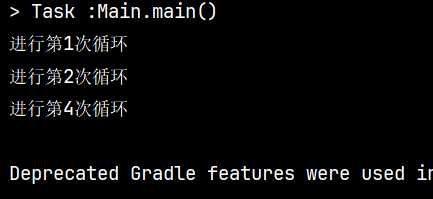
运行结果:

https://picningguoxu.080912.xyz/file/b8b905c58555560d74a84.jpg

可以看到它跳过了一次循环

break

continue不同, break则是结束整个循环.

1
2
3
4
5
6
7
8
9
10
class Main {
public static void main(String[] args) {
for (int i = 1; i < 5; i++) {
if (i == 3){
break;
}
System.out.println("进行第"+i+"次循环");
}
}
}

只需将continue简单的改为break即可.

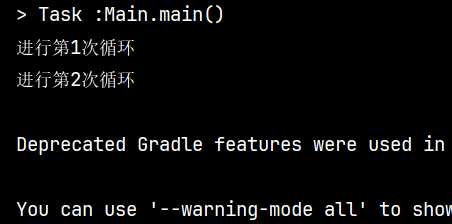
运行结果:

https://picningguoxu.080912.xyz/file/eab3b7997b39ce96a3946.jpg

可以清楚的看到循环只进行了两次.

练习: 逢七过

游戏规则: 从任意一个数字开始, 当你报的数字是7或者是7的倍数时, 都要说过.

题目: 使用Java程序在控制台中打出1-100之间满足逢七过游戏的数据.

  • 分析及回答

    思路: 先获取1-100个数字, 然后判断每一个数字, 如果符合标准就输出过, 不符合就输出原数字.

    完整代码:

    1
    2
    3
    4
    5
    6
    7
    8
    9
    10
    11
    12
    13
    14
    15
    public class Main {
    public static void main(String[] args) {
    // 循环遍历1到100的所有数字
    for (int i = 1; i <= 100; i++) {
    // 检查数字是否满足特定条件
    if (i % 10 == 7 || i / 10 % 10 == 7 || i % 7 == 0) {
    // 如果满足条件,打印"过"并跳过当前数字的后续处理
    System.out.println("过");
    continue;
    }
    // 如果不满足条件,正常打印数字
    System.out.println(i);
    }
    }
    }

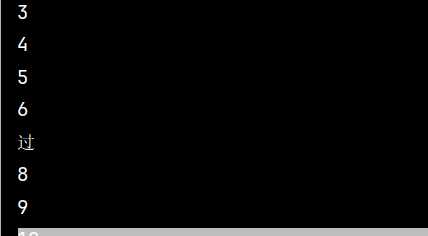
    运行结果:

    https://picningguoxu.080912.xyz/file/5cb2c856861df5c18f274.jpg

数组

数组指的是一种容器, 可以用来存储同种数据类型的多个值.

初始化指的是在内存中, 为数组容器开辟空间, 并将数据存入空间的过程.

数组的定义及初始化

定义格式

格式一

1
2
// 数据类型 [] 数组名;
int [] array;

格式二

1
2
// 数据类型 数组名 [];
int array [];

静态初始化

1
2
3
4
5
// 数据类型[] 数组名 = new 数据类型[]{元素1, 元素2, 元素3, ...}
int[] array = new int[]{1, 2, 3, 4, 5};

// 数据类型[] 数组名 = {元素1, 元素2, 元素3, ...}
int[] array = {1, 2, 3, 4, 5};

数组的地址值

数组的地址值表示数组在内存中的位置。

格式含义

[: 表示这是一个数组。

I: 表示数据类型是int型。

@:表示间隔符号,固定格式。

776ec8df: 数组的真实地址值,十六进制。

访问数组元素

索引

也叫做下标、角标;从0开始逐步+1增长,连续不间断。

1
2
3
4
// 获取数组元素:数组名[索引]
array[0]

// 添加数组元素:数组名[索引] = 具体数据或变量

在这个例子中,1的索引是0,所以要输出1就要得到第一个数据并输出。

1
2
3
int[] array = {1, 2, 3, 4, 5};
int num = array[0];
System.out.println(num);

在这里将10添加到数组array的索引0中. 添加数据后, 原来在此索引中的数据就不存在了.

1
2
3
4
5
6
int[] array = {1, 2, 3, 4, 5};
int num = array[0];
System.out.println(num);
// 添加数据
array[0] = 10;
System.out.println(array[0]);

遍历数组

将数组中所有的内容取出来, 可以进行(输出, 求和, 判断…)等操作

1
2
3
int[] array = {11, 22, 33, 44, 55};
for (int i = 0; i <= 4; i++) {
System.out.println(array[i]);

可以利用for循环来完成此次操作. 但这是知道数组长度且保持不变的遍历方法. 如果长度变了, 那么for循环的结束条件也要变.

所以, 在Java中可以使用数组名.length来调用一个关于数组的长度属性.

1
2
3
4
int[] array = {11, 22, 33, 44, 55};
for (int i = 0; i < array.length; i++) {
System.out.println(array[i]);
}

注意是int i = 0; i < array.length; i++而不是int i = 0; i <= array.length; i++.否则会出现数组越界的问题.

注意: i依次表示数组里面的每一个索引; array[1]表示数组里每一个元素.

idea自动补全数组遍历代码方式: array.fori

小练习: 数组求和

  • 分析及作答

    1
    2
    3
    4
    5
    6
    7
    int[] array = {1, 2, 3, 4, 5};
    int sum = 0;
    for (int i = 0; i < array.length; i++) {
    sum = sum + array[i];
    }
    System.out.println(sum);
    // 最终输出 15

小练习: 输出1-10能被3整除的数字

  • 分析及作答

    1
    2
    3
    4
    5
    6
    7
    8
    9
    10
    11
    12
    13
    14
    15
    16
    17
    18
    19
    20
    public class Main {
    public static void main(String[] args) {
    // 初始化一个整数数组,包含1到10的数字。
    int[] array = {1, 2, 3, 4, 5, 6, 7, 8, 9, 10};
    // 初始化一个变量用于累计能被3整除的元素的数量。
    int sum = 0;
    // 遍历数组中的每个元素。
    for (int i = 0; i < array.length; i++) {
    // 检查当前元素是否能被3整除。
    if(array[i] % 3 == 0){
    // 如果能被3整除,增加计数。
    sum++;
    }
    }
    // 输出能被3整除的元素的数量。
    System.out.println(sum);
    }
    }

    // 输出 3

小练习: 变化数据

需求: 定义一个数组, 存储1-10个数. 遍历数组得到每一个元素. 要求如果是奇数, 则将当前数字扩大两倍, 如果是偶数, 则将当前数字变成二分之一

  • 分析及作答

    1
    2
    3
    4
    5
    6
    7
    8
    9
    10
    11
    12
    13
    14
    15
    16
    17
    18
    19
    20
    21
    22
    23
    24
    25
    26
    public class Main {
    public static void main(String[] args) {
    // 初始化一个整数数组,包含1到10的整数。
    // 创建1-10个元素的数组
    int[] arr = {1, 2, 3, 4, 5, 6, 7, 8, 9, 10};

    // 遍历数组,对每个元素进行处理。
    // 遍历数组
    for (int i = 0; i < arr.length; i++) {
    // 判断当前元素是否为偶数。
    // 判断
    if (arr[i] % 2 == 0) {
    // 如果是偶数,将其除以2。
    arr[i] = arr[i] / 2;
    } else {
    // 如果是奇数,将其乘以2。
    arr[i] = arr[i] * 2;
    }
    }
    // 再次遍历数组,打印处理后的每个元素。
    // 输出
    for (int i = 0; i < arr.length; i++) {
    System.out.println(arr[i]);
    }
    }
    }

动态初始化

动态初始化:初始化时只指定数组长度,由系统为数组分配初始值。

格式: 数据类型[] 数组名 = new 数据类型[数组长度];

举个例子: int[] myArray = new int[10];

  • 这是一个简单的示例

    1
    2
    3
    4
    5
    6
    7
    8
    public class Main {
    public static void main(String[] args) {
    String[] arr = new String[2];
    arr[0] = "Hello";
    arr[1] = "World";
    System.out.println(arr[0] + " " + arr[1]);
    }
    }

默认初始化规律

整型(byte,short,int,long):默认初始化值为 0。
浮点型(float,double):默认初始化值为 0.0。
字符型(char):默认初始化值为 空格(' ',对应Unicode编码 \u0000)。
布尔型(boolean):默认初始化值为 false。
引用数据类型(如String):默认初始化值为 null。

和静态初始化的区别

静态初始化是在编码时就确定了数组的内容,而动态初始化则提供了更多的灵活性,允许在运行时确定数组的大小和内容。

  • 静态初始化详细特点
    • 在声明数组的同时,你需要指定每个元素的值。

    • 数组的长度由初始化时提供的元素数量决定。

    • 适用于你已经知道所有元素值的情况。

    • 例如:

      1
      int[] numbers = {1, 2, 3, 4, 5};
    • 这里,numbers数组被创建并初始化为具有5个元素的数组。

  • 动态初始化详细特点
    1. 动态初始化
      • 你只指定数组的长度,元素的值将被设置为默认值。

      • 数组的长度在声明时由你指定。

      • 适用于你只知道数组的大小,但不知道具体元素值的情况。

      • 例如:

        1
        int[] numbers = new int[5];
      • 这里,numbers数组被创建为长度为5的数组,所有元素默认初始化为0。

常见操作

求最值

已知数组元素为{33, 5, 17, 90, 1}, 求该数组最大值并输出到控制台.

  • 分析及作答

    1
    2
    3
    4
    5
    6
    7
    8
    9
    10
    11
    12
    13
    14
    15
    16
    17
    18
    19
    20
    21
    22
    public class Main {
    public static void main(String[] args) {
    // 初始化一个整数数组
    // 定义数组
    int[] arr = {33, 5, 17, 90, 1};

    // 假设数组的第一个元素为最大值
    // 定义max变量, 临时认为索引0是最大值
    int max = arr[0];

    // 遍历数组以查找实际的最大值
    // 遍历数组
    for (int i = 0; i < arr.length; i++) {
    // 如果当前元素大于假设的最大值,则更新最大值
    if (arr[i] > max) {
    max = arr[i];
    }
    }
    // 打印最大值
    System.out.println("最大值为:" + max);
    }
    }

Java内存分配

  • 方法运行时使用的内存,比如main方法运行,进入方法栈中执行
  • 存储对象或者数组,new来创建的,都存储在堆内存
  • 方法区 存储可以运行的class文件
  • 本地方法栈 JVM在使用操作系统功能的时候使用,和我们开发无关
  • 寄存器 给CPU使用,和我们开发无关

方法

把一些代码打包在一起,用到的时候就调用。

方法的格式

最简单的方法定义和调用

1
2
3
4
5
6
7
// 定义
public static void 方法名(){
// 方法体(就是打包起来的代码)
}

// 调用
方法名();

注意:方法必须先定义后调用。

范例:

1
2
3
4
5
6
7
8
9
10
11
public class Main {
public static void main(String[] args) {
getSum();
}
public static void getSum(){
int a = 10;
int b = 20;
int c = a + b;
System.out.println(c);
}
}

带参数的方法定义和调用

形参:全称形式参数,是指方法定义中的参数。

实参:全称实际参数,方法调用中的参数。

1
2
3
4
5
6
7
// 定义
public static void 方法名(参数1, 参数2, ...){
// 方法体(就是打包起来的代码)
}

// 调用
方法名(参数1, 参数2, ...);

注意:调用时参数必须与定义的参数一一对应。

范例:

1
2
3
4
5
6
7
8
9
10
public class Main {
public static void main(String[] args) {
getSum(20, 30); // 实参
}
// 形参
public static void getSum(int a, int b){
int c = a + b;
System.out.println(c);
}
}

带返回值的方法定义和调用

1
2
3
4
public static 数据类型 方法名(参数1, 参数2, ...){
// 方法体(就是打包起来的代码)
return 返回值;
}

范例:

1
2
3
4
5
6
7
8
9
10
public class Main {
public static void main(String[] args) {
int sum = getSum(20, 30);
System.out.println(sum);
}
public static int getSum(int val1, int val2){
int sum = val1 + val2;
return sum;
}
}

方法的重载

在同一个类中,定义了多个同名的方法,这些同名的方法具有同种的功能。

每个方法都具有不同的参数类型或参数个数,这些同名的方法,就构成了重载关系。

1
2
3
4
5
6
7
8
9
10
11
12
13
public class Main {
public static void main(String[] args) {
int sum = getSum(20, 30);
int sum2 = getSum(10, 20, 30);
System.out.println(sum +"\n" + sum2);
}
public static int getSum(int val1, int val2) {
return val1 + val2;
}
public static int getSum(int val1, int val2, int val3) {
return val1 + val2 + val3;
}
}

练习:求数组最大值

设计一个方法求数组最大值,并返回最大值。

1
2
3
4
5
6
7
8
9
10
11
12
13
14
15
16
17
public class Main {
public static void main(String[] args) {
int[] arr = {1, 5, 7, 3, 10};
System.out.println(getMax(arr));
}

public static int getMax(int[] arr) {
int result = arr[0];
// 使用增强型for循环
for (int j : arr) {
if (j > result) {
result = j;
}
}
return result;
}
}

练习:判断是否存在

定义一个方法判断数组中的某一个数是否存在,将结果返回给调用处。

1
2
3
4
5
6
7
8
9
10
11
12
13
14
15
public class Main {
public static void main(String[] args) {
int[] arr = {12, 93, 72, 102, 23};
System.out.println(contains(arr, 10));
}

public static boolean contains(int[] arr, int number) {
for (int i : arr) {
if (number == i) {
return true;
}
}
return false;
}
}

这里使用增强型for循环遍历列表。

注意:增强型for循环列表的每一项是 i ,而传统for循环的每一项是 arr[i] 。

练习:复制数组

将数组arr中索引from(包含from)开始,到索引to(不包含to)的元素复制到新数组中,返回新数组。

1
2
3
4
5
6
7
8
9
10
11
12
13
14
15
16
17
18
19
20
21
22
public class Main {
public static void main(String[] args) {
int[] arr = {12, 93, 72, 102, 23};
//使用方法
int[] copyArr = copyOfRange(arr, 1, 4);
// 遍历输出
for (int i : copyArr) {
System.out.println(i);
}
}

public static int[] copyOfRange(int[] arr, int from, int to) {
int[] newArr = new int[to - from];
int index = 0; // 伪造索引的思想
for (int i = from; i < to; i++) {
newArr[index] = arr[i];
index++;
}
return newArr;
}
}

练习:卖飞机票

机票价格按照淡季旺季、头等舱和经济舱收费、输入机票原价、月份和头等舱或经济舱。

按照如下规则计算机票价格:旺季(5-10月)头等舱9折,经济舱8.5折,淡季(11月到来年4月)头等舱7折,经济舱6.5折。

传统写法:

1
2
3
4
5
6
7
8
9
10
11
12
13
14
15
16
17
18
19
20
21
22
23
24
25
26
27
28
29
30
31
32
33
34
35
36
37
38
39
40
import java.util.Scanner;

public class Main {
public static void main(String[] args) {
Scanner sc = new Scanner(System.in);
System.out.print("请输入机票的原价:");
int ticket = sc.nextInt();
System.out.print("请输入当前月份:");
int month = sc.nextInt();
System.out.print("请输入仓位(0:头等舱 1:经济舱):");
int seat = sc.nextInt();

if (month >= 5 && month <= 10) {
// 旺季
if (seat == 0) {
// 头等舱
ticket = (int)(ticket * 0.9);
} else if (seat == 1) {
// 经济舱
ticket = (int)(ticket * 0.85);
} else {
System.out.println("没有这个仓位");
}
} else if ((month >= 1 && month <= 4) || (month >= 11 && month <= 12)){
// 淡季
if (seat == 0) {
// 头等舱
ticket = (int)(ticket * 0.7);
} else if (seat == 1) {
// 经济舱
ticket = (int)(ticket * 0.65);
} else {
System.out.println("没有这个仓位");
}
} else {
System.out.println("键盘录入月份不合法");
}
System.out.println(String.format("价格:%d", ticket));
}
}

简洁方法:

1
2
3
4
5
6
7
8
9
10
11
12
13
14
15
16
17
18
19
20
21
22
23
24
25
26
27
28
29
30
31
32
33
34
35
36
import java.util.Scanner;

public class Main {
public static void main(String[] args) {
Scanner sc = new Scanner(System.in);
System.out.print("请输入机票的原价:");
int ticket = sc.nextInt();
System.out.print("请输入当前月份:");
int month = sc.nextInt();
System.out.print("请输入仓位(0:头等舱 1:经济舱):");
int seat = sc.nextInt();

if (month >= 5 && month <= 10) {
// 旺季
ticket = getPrice(ticket, seat, 0.9, 0.85);
} else if ((month >= 1 && month <= 4) || (month >= 11 && month <= 12)){
// 淡季
ticket = getPrice(ticket, seat, 0.7, 0.65);
} else {
System.out.println("键盘录入月份不合法");
}
System.out.printf("价格:%d%n", ticket);
}
public static int getPrice(int ticket, int seat, double v0, double v1) {
if (seat == 0) {
// 头等舱
ticket = (int)(ticket * v0);
} else if (seat == 1) {
// 经济舱
ticket = (int)(ticket * v1);
} else {
System.out.println("没有这个仓位");
}
return ticket;
}
}